# Introduction to software reverse engineering
- Author: Tejashwi Kalp Taru
- Published: 2019-08-14
- Canonical: https://tejashwi.in/introduction-to-software-reverse-engineering/
- Categories: Reverse Engineering, Windows
- Tags: reverseengineering, decompile, windows
- Summary: Reverse engineering, in computer programming, is a technique used to analyze software in order to identify and understand the parts it is composed of. The usual reasons for reverse engineering a piece of software are to recreate the program, to build something similar to it, to exploit its weaknesses or strengthen its defenses
Reverse engineering is taking apart software to understand how it works. Security researchers use it to analyze malware. Testers use it for black-box security analysis. Sometimes you just want to figure out how something was built.
**This tutorial requires basic understanding of assembly language. Take a crash course [here](https://www.cs.virginia.edu/~evans/cs216/guides/x86.html)**
## The Target
Here's a keygen challenge. It wants a name and serial key, checks them internally, and shows success or failure.
That's enough to start.
## Finding the Check
I'm using [x64 Dbg](https://x64dbg.com/#start) for debugging and [IDA Pro](https://www.hex-rays.com/products/ida/) for decompilation.
Load the application in x64dbg. Search for the string `Enter your name`:
Double-click to jump to where it's used:
Reading the assembly:
- `printf` and `scanf` handle input for name and serial
- A function gets called, returns some value X
- X gets compared to the serial we entered
- Match = success, mismatch = failure
The interesting part is that function. Set a breakpoint, run with dummy input, step into when the breakpoint hits.
Quick analysis:
- Takes the name as input
- Gets name length with `strlen`
- Loops through each character doing some calculation (notice the JBE instruction)
- Formats the result as `%d-%d`
## IDA Pro Does the Heavy Lifting
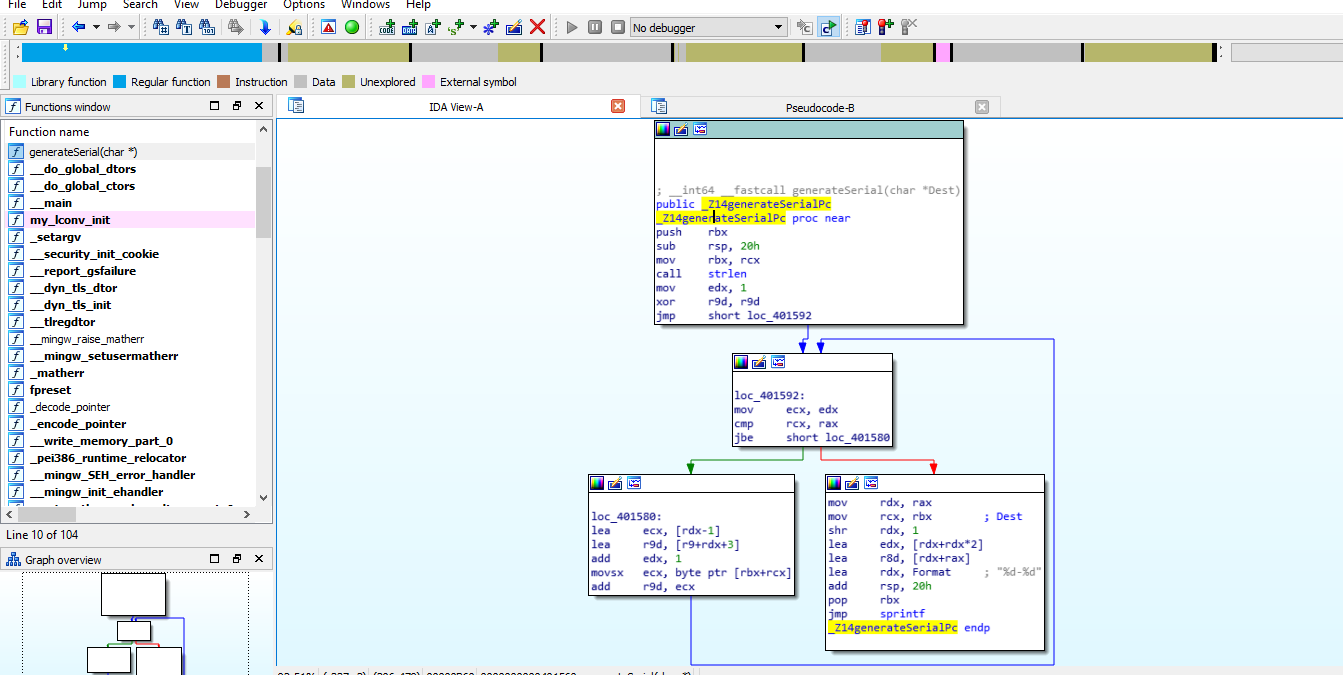
Being lazy, I'm not going to step through every instruction. Note the function's starting address, fire up IDA Pro, load the application, and navigate to that address. IDA shows a graph view:
Select the function, press F5. IDA decompiles the assembly into readable C:
## Building the Keygen
Clean up IDA's output:
```c
void generateSerial(char name[]) {
int length = strlen(name);
int counter = 1;
int value = 0;
while(counter <= length) {
int index = counter - 1;
int temp = value + counter + 3;
counter++;
value = (unsigned int) (name[index] + temp);
}
sprintf(name, "%d-%d", 3 * (unsigned int)(length >> 1) + (unsigned int) length, value);
}
```
Complete keygen:
```c
#include
#include
#define MAX_NAME_LEN 20
void generateSerial(char name[]) {
int length = strlen(name);
int counter = 1;
int value = 0;
while(counter <= length) {
int index = counter - 1;
int temp = value + counter + 3;
counter++;
value = (unsigned int) (name[index] + temp);
}
sprintf(name, "%d-%d", 3 * (unsigned int)(length >> 1) + (unsigned int) length, value);
}
int main() {
char name[MAX_NAME_LEN];
printf("Enter your name: ");
fgets(name, sizeof name, stdin);
name[strcspn(name, "\n")] = '\0';
// calculate serial for the given name
generateSerial(name);
printf("Serial: %s\n", name);
return 0;
}
```
For `tejashwi`, the keygen returns `20-923`. Let's verify:
Download the sample application and keygen source here (password: `tejashwi.io`)
## Going Further
This was a simple example. If you want to go deeper:
1. Get comfortable with C
2. Learn x86 assembly basics
3. Understand Windows PE file format
4. Check out `Lena151`'s video tutorials on Windows reverse engineering: [here](https://tuts4you.com/e107_plugins/download/download.php?list.17)
Also read [https://lifeinhex.com/tag/lena151/](https://lifeinhex.com/tag/lena151/)
For a smaller, practical example of the same habit, I used it to find undocumented functions in `dwmapi.dll` and [change the Windows Aero color from code](/changing-windows-aero-color-win32-programming/). For a hostile one, I pulled apart [malware a client shipped me inside `.git/hooks/`](/git-hook-trojan-supply-chain-malware/).