# A tiny game console based on Attiny85

- Author: Tejashwi Kalp Taru
- Published: 2020-03-04
- Canonical: https://tejashwi.in/a-tiny-game-console-based-on-attiny85/
- Categories: Electronics, DIY
- Tags: diy, electronics, pcb
- Summary: Attiny85 is one of the famous microcontrollers among enthusiasts group. It is high performance yet low power 8 bit RISC based microcontroller having a tiny 8KB of flash memory and 6 GPIO pins. In this tutorial, I will be creating a very tiny handheld game console based on this chip. The idea is not new and has been already implemented, but I am going to discuss what issues I faced during this development and how I made this.

I had some Attiny85 chips lying around my desk and a few free days, so I went looking for projects. I found that [Daniel Champagne](https://www.tinyjoypad.com/tiny-joypad) had already created several games for this chip. His schematics were missing some resistor values, but he replied quickly when I emailed him.

This isn't a retro gaming device. You can't play 8-bit Nintendo games on an Attiny85. But you can play games specifically written for it, or write your own.

## The OLED Problem

The project uses an SSD1306-based I2C OLED screen. I had a few of these in my lab. I compiled Daniel's code using the `ssd1306xled` library from [Github](https://github.com/Defragster/ssd1306xled). It compiled fine. Nothing appeared on screen.

I tried several different OLED screens. None worked. I tested them with the Adafruit library. They all worked fine. The screens weren't the problem.

The Github library is a port of the AVR TinuSaur project, and the original is hosted on [BitBucket](https://bitbucket.org/tinusaur/ssd1306xled/src/default/). Searching led me to a Tinusaur article [describing compatibility issues](https://tinusaur.org/tag/ssd1306xled/). Most OLED screens from China claim to use SSD1306 but sometimes use SSD1315 or SSH1306 instead.

I cloned the original repository and modified it for my Attiny85. Still nothing. Digging into the code, I concluded the I2C implementation itself was broken. You can follow my debugging journey in [this issue thread](https://bitbucket.org/tinusaur/ssd1306xled/issues/5/issue-with-ssd1306).

## The Fix

The Attiny85 has 8KB of flash memory. The game uses about 6KB, leaving 2KB for the OLED driver. Libraries like Adafruit's or Tiny4kOled would push the program over 8KB. I needed the lightweight ssd1306xled library to work.

I took the latest `SSD1306XLED` library and replaced its I2C implementation with the working one from [TinyI2C](https://github.com/technoblogy/tiny-i2c). That fixed it.

My working fork is on [Github](https://github.com/tejashwikalptaru/ssd1306xled).

*Update:* that fork did not stay a fork. It turned into a maintained library with contributors, a release cycle and a documentation site. I wrote about [how that happened](/journey-of-ssd1306xled-library/), and later used it to build a [Nokia Composer ringtone player](/nokia-composer-attiny85-ringtone-player/) on the same chip.

## The Schematic

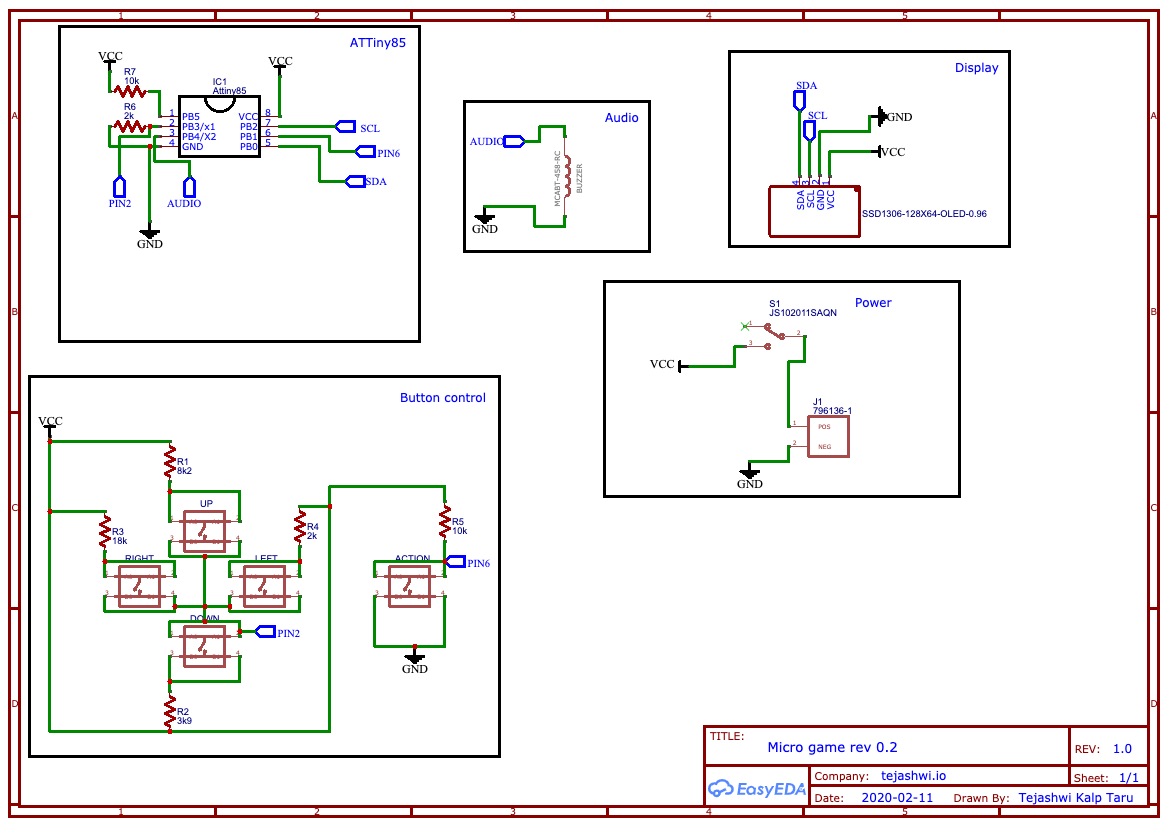
While researching the OLED issue, I found a modified version of Daniel's project by Dave on the [element14 community](https://www.element14.com/community/docs/DOC-91439/l/episode-384-retro-gaming-handheld-without-a-pcb). Dave optimized the Attiny85 pin usage. If you're interested in this project, watch his video.

## PCB Design

The goal was simple: make it as small as possible using SMD components. I used 0805 resistors. They're small but still solderable by hand.

For quick projects I use [EasyEDA](https://easyeda.com/editor) instead of [Altium](https://www.altium.com/altium-designer/). Here are the components I used:

<div class="table-scroll">
    <table>
    <thead>
        <tr>
            <th>Quantity</th>
            <th>Manufacturer Part Number</th>
            <th>Manufacturer Name</th>
            <th>Notes</th>
        </tr>
    </thead>
    <tbody>
        <tr>
            <td align="right">1.0</td>
            <td>ATTINY85-20PU</td>
            <td>MICROCHIP</td>
            <td>Attiny85 IC</td>
        </tr>
        <tr>
            <td align="right">5.0</td>
            <td>SKQGAFE010</td>
            <td>ALPS ALPINE</td>
            <td>Push button</td>
        </tr>
        <tr>
            <td align="right">2.0</td>
            <td>MCWR08X2001FTL</td>
            <td>MULTICOMP PRO</td>
            <td>2K resistor</td>
        </tr>
        <tr>
            <td align="right">2.0</td>
            <td>WR08X1002FTL</td>
            <td>WALSIN</td>
            <td>10K resistor</td>
        </tr>
        <tr>
            <td align="right">1.0</td>
            <td>MCPWR05FTEW8201</td>
            <td>MULTICOMP PRO</td>
            <td>8.2K (8K2) resistor</td>
        </tr>
        <tr>
            <td align="right">1.0</td>
            <td>ERJ6GEYJ392V</td>
            <td>PANASONIC</td>
            <td>3.9K (3K9) resistor</td>
        </tr>
        <tr>
            <td align="right">1.0</td>
            <td>MCWR08X1802FTL</td>
            <td>MULTICOMP PRO</td>
            <td>18K resistor</td>
        </tr>
        <tr>
            <td align="right">1.0</td>
            <td>MCABT-458-RC</td>
            <td>MULTICOMP PRO</td>
            <td>Speaker</td>
        </tr>
        <tr>
            <td align="right">1.0</td>
            <td>796136-1</td>
            <td>TE CONNECTIVITY</td>
            <td>CR2032 battery holder</td>
        </tr>
        <tr>
            <td align="right">1.0</td>
            <td>JS102011SAQN</td>
            <td>C &amp; K COMPONENTS</td>
            <td>Power switch</td>
        </tr>
        <tr>
            <td align="right">1.0</td>
            <td></td>
            <td>SSD1306</td>
            <td>0.96 inch white OLED screen</td>
        </tr>
    </tbody>
    </table>
</div>

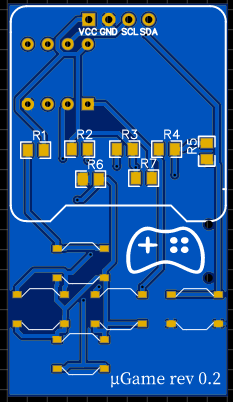
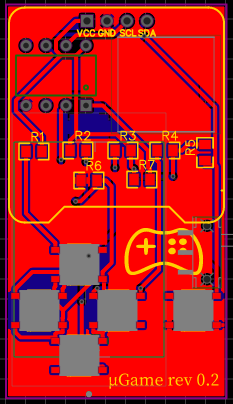
Using Dave's schematic as a reference, I created my PCB:

<div class="text-center">
    <picture><source type="image/avif" srcset="/assets/images/attiny85-game/design-a-schematic-480w.avif 480w, /assets/images/attiny85-game/design-a-schematic-640w.avif 640w, /assets/images/attiny85-game/design-a-schematic-768w.avif 768w, /assets/images/attiny85-game/design-a-schematic.avif 1169w" sizes="(max-width: 768px) 100vw, 768px"><source type="image/webp" srcset="/assets/images/attiny85-game/design-a-schematic-480w.webp 480w, /assets/images/attiny85-game/design-a-schematic-640w.webp 640w, /assets/images/attiny85-game/design-a-schematic.webp 1169w" sizes="(max-width: 768px) 100vw, 768px"><source type="image/png" srcset="/assets/images/attiny85-game/design-a-schematic-480w.png 480w, /assets/images/attiny85-game/design-a-schematic.png 1169w" sizes="(max-width: 768px) 100vw, 768px"><img src="/assets/images/attiny85-game/design-a-schematic.png" alt="Design A schematic" class="" width="1169" height="827" loading="lazy" decoding="async">
    </picture>
</div>

<div id="pcbSlider" class="carousel slide" data-bs-ride="carousel">
    <div class="carousel-indicators">
        <button type="button" data-bs-target="#pcbSlider" data-bs-slide-to="0" class="active" aria-current="true" aria-label="Slide 1"></button>
        <button type="button" data-bs-target="#pcbSlider" data-bs-slide-to="1" aria-label="Slide 2"></button>
        <button type="button" data-bs-target="#pcbSlider" data-bs-slide-to="2" aria-label="Slide 3"></button>
    </div>

    <div class="carousel-inner text-center">
        <div class="carousel-item active">
            <picture><source type="image/avif" srcset="/assets/images/attiny85-game/design-a-front.avif"><source type="image/webp" srcset="/assets/images/attiny85-game/design-a-front.webp"><img src="/assets/images/attiny85-game/design-a-front.png" alt="Design A front" class="" width="233" height="402" loading="lazy" decoding="async">
    </picture>
        </div>
        <div class="carousel-item">
            <picture><source type="image/webp" srcset="/assets/images/attiny85-game/design-a-back.webp"><img src="/assets/images/attiny85-game/design-a-back.png" alt="Design A back" class="" width="229" height="404" loading="lazy" decoding="async">
    </picture>
        </div>
        <div class="carousel-item">
            <picture><source type="image/avif" srcset="/assets/images/attiny85-game/design-a-pcb.avif"><source type="image/webp" srcset="/assets/images/attiny85-game/design-a-pcb.webp"><img src="/assets/images/attiny85-game/design-a-pcb.png" alt="Design A PCB" class="" width="233" height="404" loading="lazy" decoding="async">
    </picture>
        </div>
    </div>

    <button class="carousel-control-prev" type="button" data-bs-target="#pcbSlider" data-bs-slide="prev">
        <span class="carousel-control-prev-icon" aria-hidden="true"></span>
        <span class="sr-only">Previous</span>
    </button>
    <button class="carousel-control-next" type="button" data-bs-target="#pcbSlider" data-bs-slide="next">
        <span class="carousel-control-next-icon" aria-hidden="true"></span>
        <span class="sr-only">Next</span>
    </button>
</div>

## Another OLED Mistake

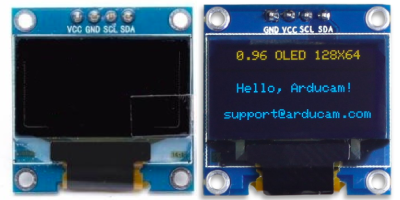
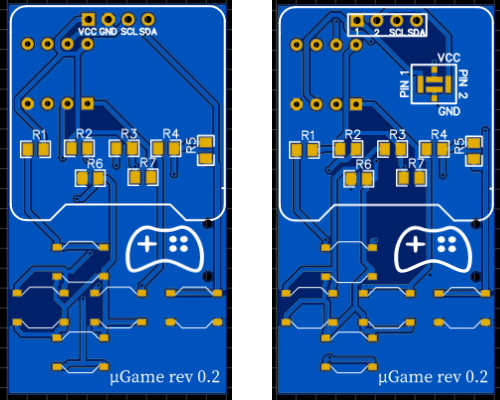
I ordered the PCB, then noticed a problem during the week-long wait. Look at the pin order: `VCC-GND-SCL-SDA`. Some OLED screens have the first two pins swapped.

<div class="text-center">
    <picture><img src="/assets/images/attiny85-game/SSD1306-0.96-types.png" alt="two types of SSD1306 OLED screen" class="" width="400" height="200" loading="lazy" decoding="async">
    </picture>
</div>

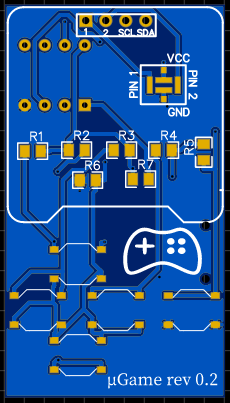
You can fix this with trace cuts and jumpers, but I made a second design with configurable pads:

<div class="text-center">
    <picture><source type="image/avif" srcset="/assets/images/attiny85-game/design-b-front.avif"><source type="image/webp" srcset="/assets/images/attiny85-game/design-b-front.webp"><img src="/assets/images/attiny85-game/design-b-front.png" alt="Design B front" class="" width="230" height="403" loading="lazy" decoding="async">
    </picture>
</div>

The first two pins are labeled `1 and 2` with a 4-pad box for configuration. If your screen is `VCC-GND`, connect PIN1 to VCC and PIN2 to GND. If it's `GND-VCC`, reverse them.

<div class="text-center">
    <picture><source type="image/avif" srcset="/assets/images/attiny85-game/two-types.avif"><source type="image/webp" srcset="/assets/images/attiny85-game/two-types.webp"><img src="/assets/images/attiny85-game/two-types.png" alt="two types of PCB" class="" width="500" height="400" loading="lazy" decoding="async">
    </picture>
</div>

I call these Design A (specific to `VCC-GND-SCL-SDA` screens) and Design B (works with either pin order).

## Assembly

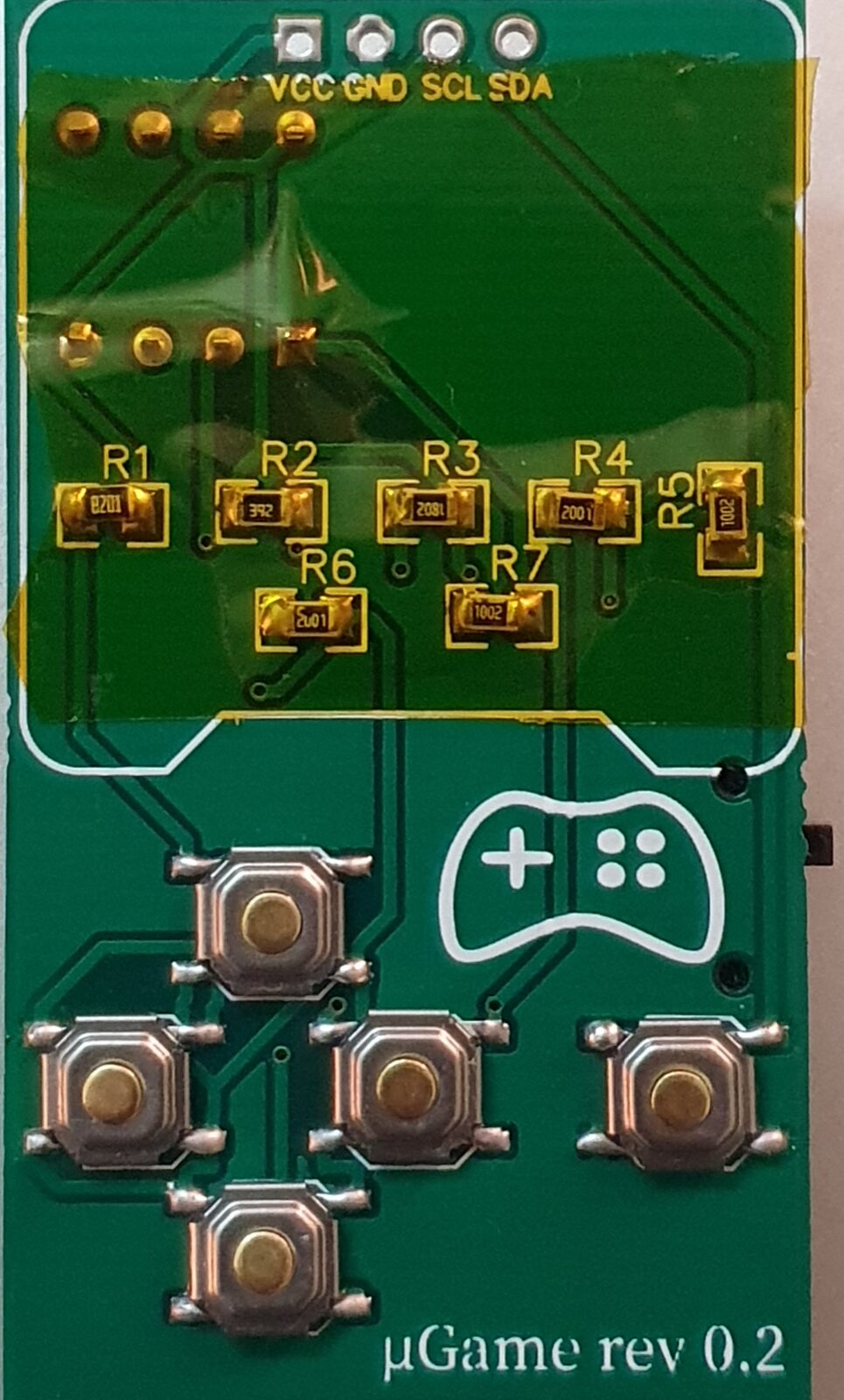
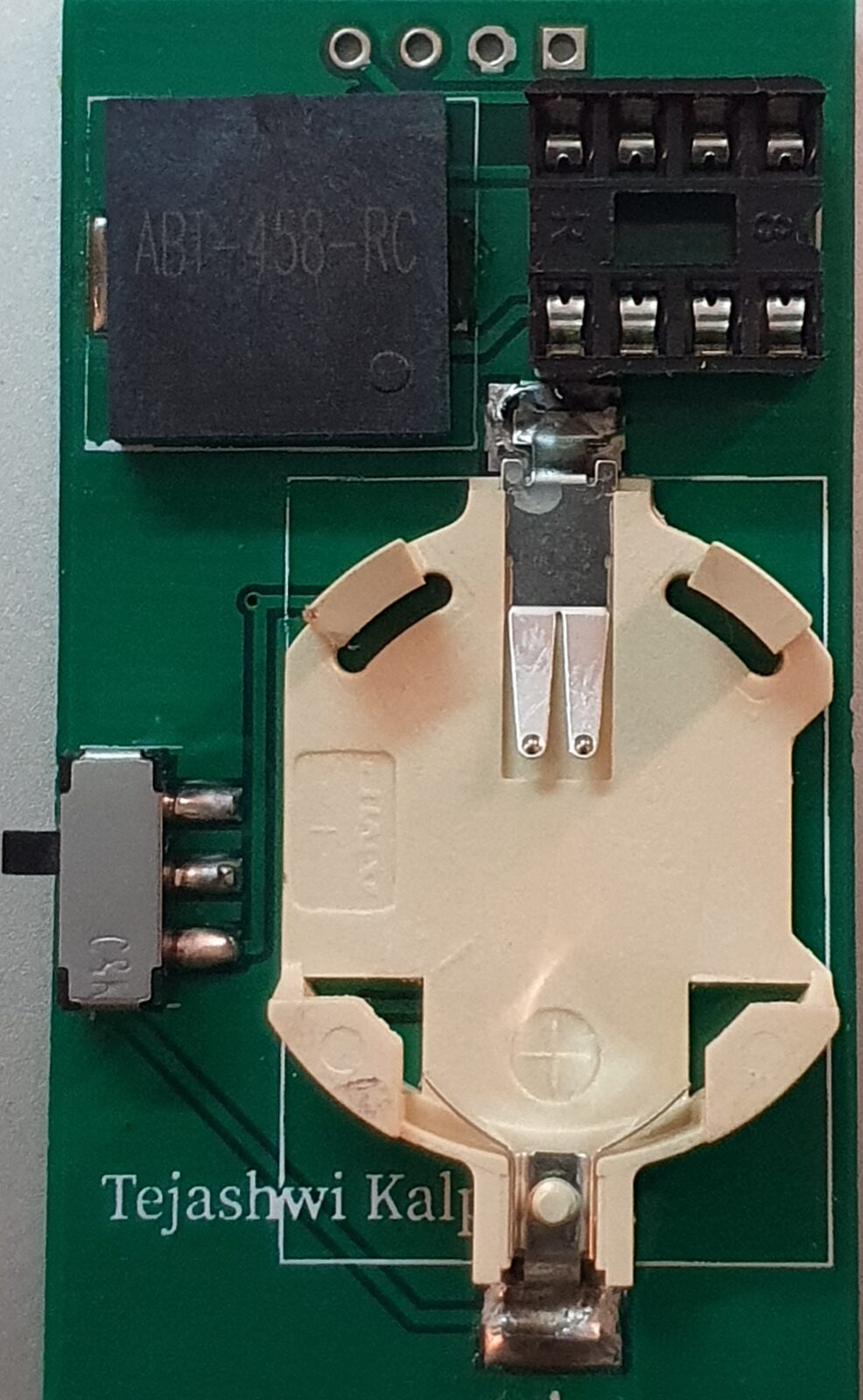
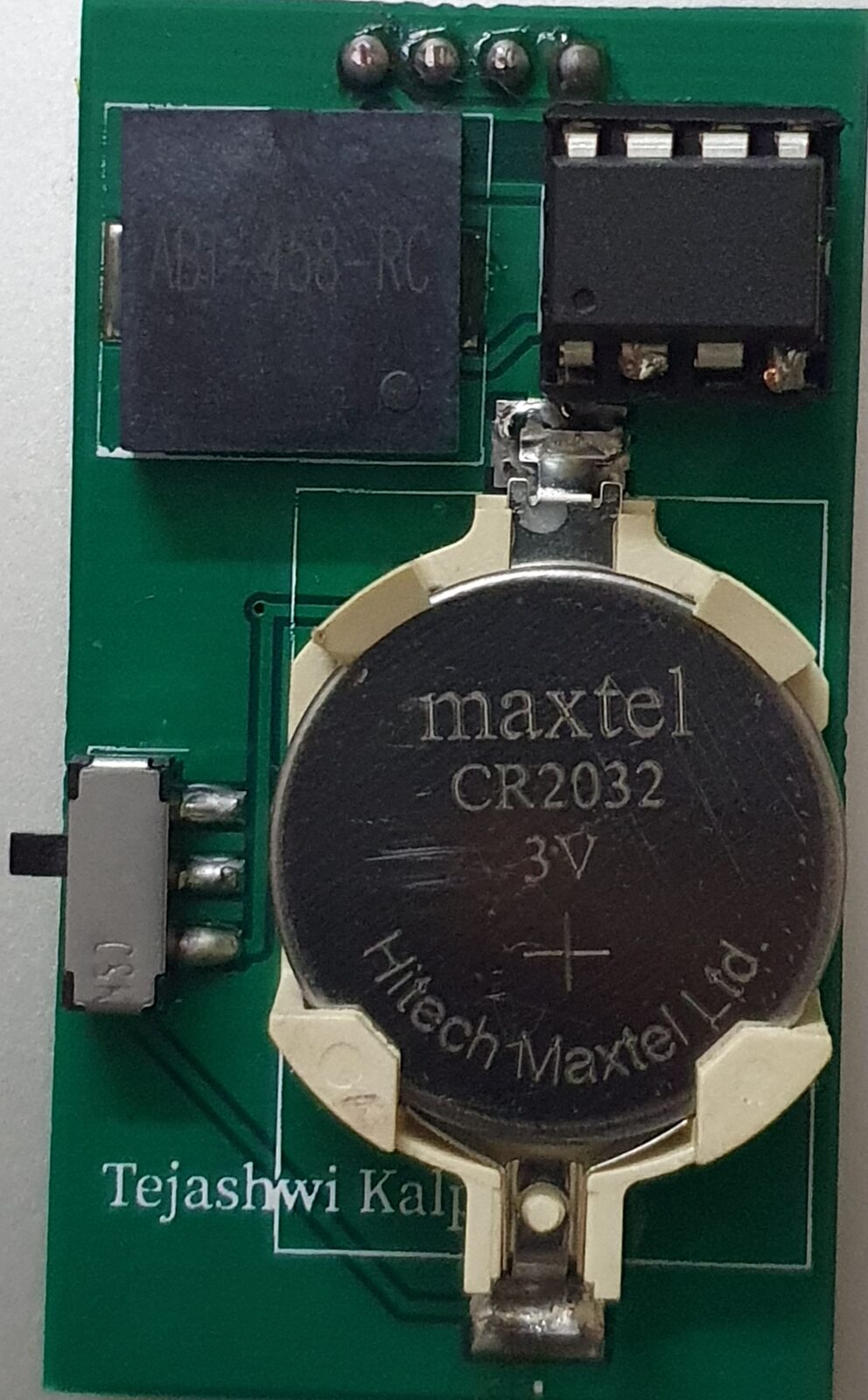
After a week, the PCB and components arrived.

<div id="imageSlider" class="carousel slide" data-bs-ride="carousel">
    <div class="carousel-indicators">
        <button type="button" data-bs-target="#imageSlider" data-bs-slide-to="0" class="active" aria-current="true" aria-label="Slide 1"></button>
        <button type="button" data-bs-target="#imageSlider" data-bs-slide-to="1" aria-label="Slide 2"></button>
        <button type="button" data-bs-target="#imageSlider" data-bs-slide-to="2" aria-label="Slide 3"></button>
        <button type="button" data-bs-target="#imageSlider" data-bs-slide-to="3" aria-label="Slide 4"></button>
    </div>

    <div class="carousel-inner text-center">
        <div class="carousel-item active">
            <picture><source type="image/avif" srcset="/assets/images/attiny85-game/20200314_205335-480w.avif 480w, /assets/images/attiny85-game/20200314_205335-640w.avif 640w, /assets/images/attiny85-game/20200314_205335-768w.avif 768w, /assets/images/attiny85-game/20200314_205335.avif 965w" sizes="(max-width: 337px) 100vw, 337px"><source type="image/webp" srcset="/assets/images/attiny85-game/20200314_205335-480w.webp 480w, /assets/images/attiny85-game/20200314_205335-640w.webp 640w, /assets/images/attiny85-game/20200314_205335-768w.webp 768w, /assets/images/attiny85-game/20200314_205335-960w.webp 960w, /assets/images/attiny85-game/20200314_205335.webp 965w" sizes="(max-width: 337px) 100vw, 337px"><source type="image/jpeg" srcset="/assets/images/attiny85-game/20200314_205335-480w.jpg 480w, /assets/images/attiny85-game/20200314_205335-640w.jpg 640w, /assets/images/attiny85-game/20200314_205335-768w.jpg 768w, /assets/images/attiny85-game/20200314_205335-960w.jpg 960w, /assets/images/attiny85-game/20200314_205335.jpg 965w" sizes="(max-width: 337px) 100vw, 337px"><img src="/assets/images/attiny85-game/20200314_205335.jpg" alt="Assembled front" class="" width="965" height="1600" loading="lazy" decoding="async">
    </picture>
        </div>
        <div class="carousel-item">
            <picture><source type="image/avif" srcset="/assets/images/attiny85-game/20200314_205316-480w.avif 480w, /assets/images/attiny85-game/20200314_205316-640w.avif 640w, /assets/images/attiny85-game/20200314_205316-768w.avif 768w, /assets/images/attiny85-game/20200314_205316-960w.avif 960w, /assets/images/attiny85-game/20200314_205316.avif 986w" sizes="(max-width: 345px) 100vw, 345px"><source type="image/webp" srcset="/assets/images/attiny85-game/20200314_205316-480w.webp 480w, /assets/images/attiny85-game/20200314_205316-640w.webp 640w, /assets/images/attiny85-game/20200314_205316-768w.webp 768w, /assets/images/attiny85-game/20200314_205316-960w.webp 960w, /assets/images/attiny85-game/20200314_205316.webp 986w" sizes="(max-width: 345px) 100vw, 345px"><source type="image/jpeg" srcset="/assets/images/attiny85-game/20200314_205316-480w.jpg 480w, /assets/images/attiny85-game/20200314_205316-640w.jpg 640w, /assets/images/attiny85-game/20200314_205316-768w.jpg 768w, /assets/images/attiny85-game/20200314_205316-960w.jpg 960w, /assets/images/attiny85-game/20200314_205316.jpg 986w" sizes="(max-width: 345px) 100vw, 345px"><img src="/assets/images/attiny85-game/20200314_205316.jpg" alt="Assembled back" class="" width="986" height="1600" loading="lazy" decoding="async">
    </picture>
        </div>
        <div class="carousel-item">
            <picture><source type="image/avif" srcset="/assets/images/attiny85-game/20200314_205255-480w.avif 480w, /assets/images/attiny85-game/20200314_205255-640w.avif 640w, /assets/images/attiny85-game/20200314_205255-768w.avif 768w, /assets/images/attiny85-game/20200314_205255.avif 967w" sizes="(max-width: 338px) 100vw, 338px"><source type="image/webp" srcset="/assets/images/attiny85-game/20200314_205255-480w.webp 480w, /assets/images/attiny85-game/20200314_205255-640w.webp 640w, /assets/images/attiny85-game/20200314_205255-768w.webp 768w, /assets/images/attiny85-game/20200314_205255-960w.webp 960w, /assets/images/attiny85-game/20200314_205255.webp 967w" sizes="(max-width: 338px) 100vw, 338px"><source type="image/jpeg" srcset="/assets/images/attiny85-game/20200314_205255-480w.jpg 480w, /assets/images/attiny85-game/20200314_205255-640w.jpg 640w, /assets/images/attiny85-game/20200314_205255-768w.jpg 768w, /assets/images/attiny85-game/20200314_205255-960w.jpg 960w, /assets/images/attiny85-game/20200314_205255.jpg 967w" sizes="(max-width: 338px) 100vw, 338px"><img src="/assets/images/attiny85-game/20200314_205255.jpg" alt="Assembled front 2" class="" width="967" height="1600" loading="lazy" decoding="async">
    </picture>
        </div>
        <div class="carousel-item">
            <picture><source type="image/avif" srcset="/assets/images/attiny85-game/20200314_205234-480w.avif 480w, /assets/images/attiny85-game/20200314_205234-640w.avif 640w, /assets/images/attiny85-game/20200314_205234-768w.avif 768w, /assets/images/attiny85-game/20200314_205234-960w.avif 960w, /assets/images/attiny85-game/20200314_205234.avif 992w" sizes="(max-width: 347px) 100vw, 347px"><source type="image/webp" srcset="/assets/images/attiny85-game/20200314_205234-480w.webp 480w, /assets/images/attiny85-game/20200314_205234-640w.webp 640w, /assets/images/attiny85-game/20200314_205234-768w.webp 768w, /assets/images/attiny85-game/20200314_205234-960w.webp 960w, /assets/images/attiny85-game/20200314_205234.webp 992w" sizes="(max-width: 347px) 100vw, 347px"><source type="image/jpeg" srcset="/assets/images/attiny85-game/20200314_205234-480w.jpg 480w, /assets/images/attiny85-game/20200314_205234-640w.jpg 640w, /assets/images/attiny85-game/20200314_205234-768w.jpg 768w, /assets/images/attiny85-game/20200314_205234-960w.jpg 960w, /assets/images/attiny85-game/20200314_205234.jpg 992w" sizes="(max-width: 347px) 100vw, 347px"><img src="/assets/images/attiny85-game/20200314_205234.jpg" alt="Assembled back 2" class="" width="992" height="1600" loading="lazy" decoding="async">
    </picture>
        </div>
    </div>

    <button class="carousel-control-prev" type="button" data-bs-target="#imageSlider" data-bs-slide="prev">
        <span class="carousel-control-prev-icon" aria-hidden="true"></span>
        <span class="sr-only">Previous</span>
    </button>
    <button class="carousel-control-next" type="button" data-bs-target="#imageSlider" data-bs-slide="next">
        <span class="carousel-control-next-icon" aria-hidden="true"></span>
        <span class="sr-only">Next</span>
    </button>

</div>

## Calibrating the Controls

The directional buttons connect to PIN 2 (A3) of the Attiny85. The code uses `analogRead` to determine which button is pressed, but the exact values depend on your resistors and wiring. Use this code to find your values:

```c
void setup() {
    _delay_ms(40);
    SSD1306.ssd1306_init();
}

void loop() {
    _delay_ms(500);
    SSD1306.ssd1306_fillscreen(0);
    int value = analogRead(A3);
    if(value > 0) {
        char buf[20];
        sprintf(buf, "value: %d", value);
        SSD1306.ssd1306_setpos(0, 1);
        SSD1306.ssd1306_string_font6x8(buf);
    }
}
```

My values:
- UP: 180-250
- DOWN: 300-400
- LEFT: 90-110
- RIGHT: >400

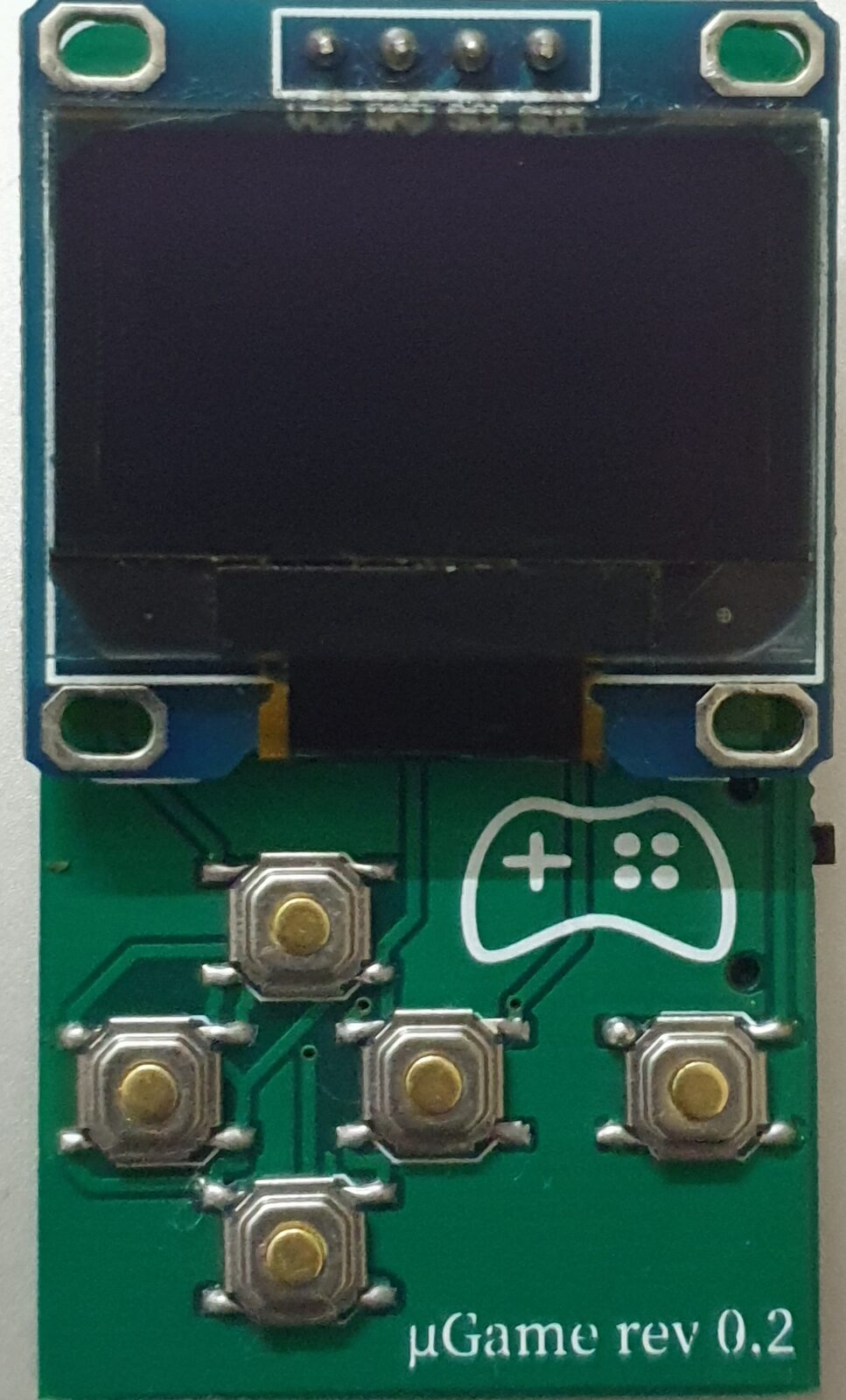
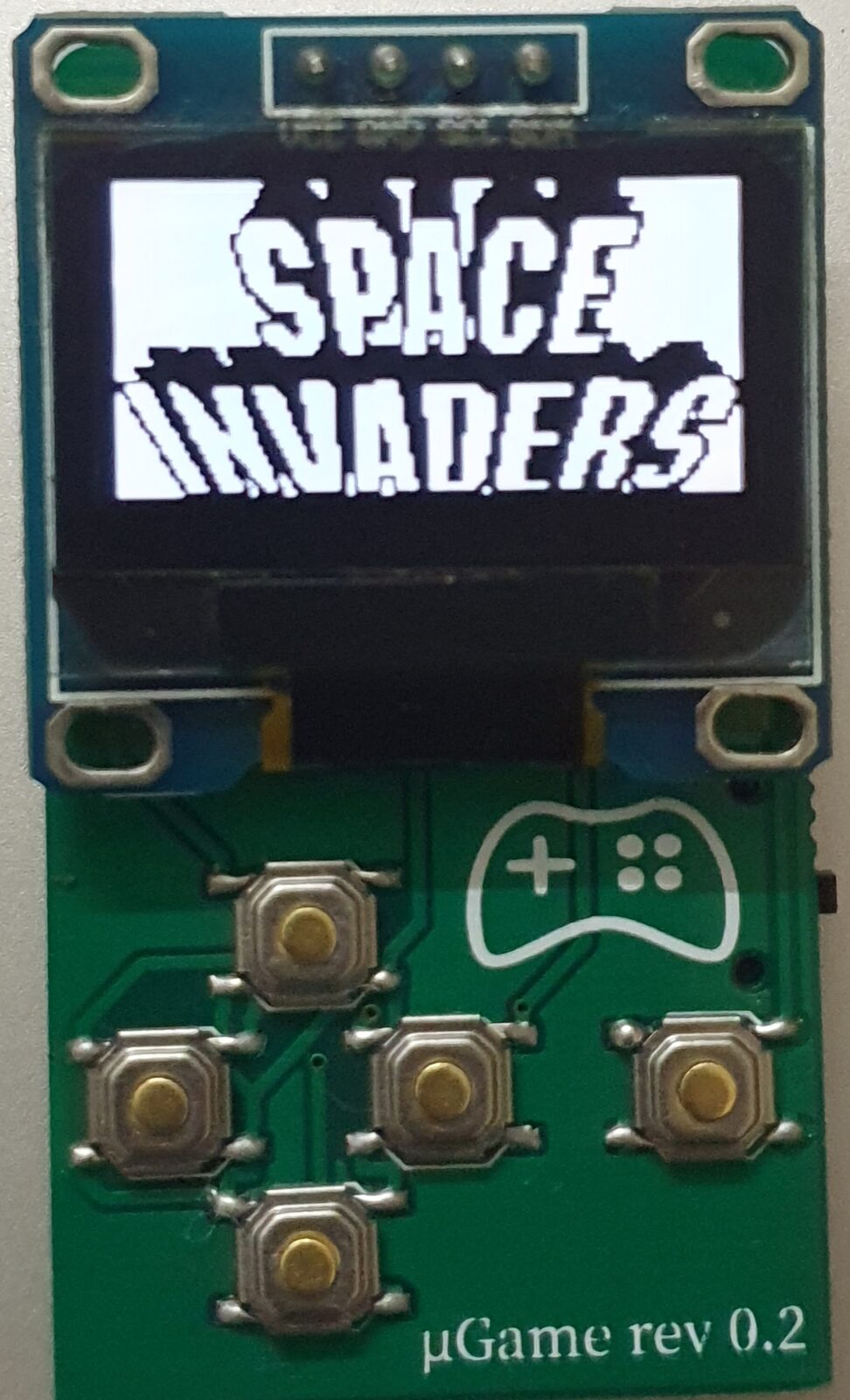
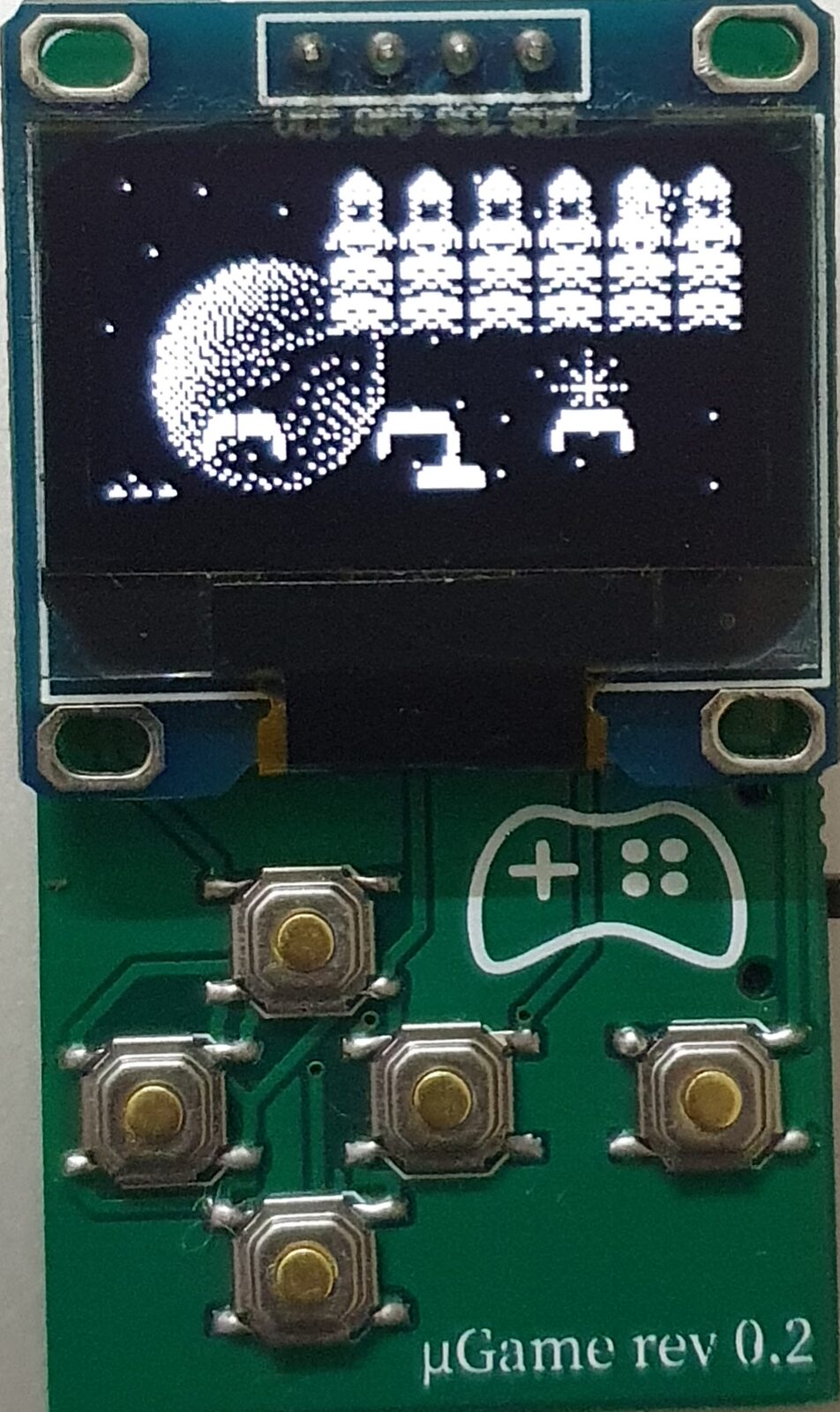
Update these in the game's loop function, compile, and burn to the Attiny85. You can use an Arduino as ISP or a USBasp programmer.

<div id="gameSlider" class="carousel slide" data-bs-ride="carousel">
    <div class="carousel-indicators">
        <button type="button" data-bs-target="#gameSlider" data-bs-slide-to="0" class="active" aria-current="true" aria-label="Slide 1"></button>
        <button type="button" data-bs-target="#gameSlider" data-bs-slide-to="1" aria-label="Slide 2"></button>
    </div>

    <div class="carousel-inner text-center">
        <div class="carousel-item active">
            <picture><source type="image/avif" srcset="/assets/images/attiny85-game/20200314_205203-480w.avif 480w, /assets/images/attiny85-game/20200314_205203-640w.avif 640w, /assets/images/attiny85-game/20200314_205203-768w.avif 768w, /assets/images/attiny85-game/20200314_205203-960w.avif 960w, /assets/images/attiny85-game/20200314_205203.avif 972w" sizes="(max-width: 340px) 100vw, 340px"><source type="image/webp" srcset="/assets/images/attiny85-game/20200314_205203-480w.webp 480w, /assets/images/attiny85-game/20200314_205203-640w.webp 640w, /assets/images/attiny85-game/20200314_205203-768w.webp 768w, /assets/images/attiny85-game/20200314_205203-960w.webp 960w, /assets/images/attiny85-game/20200314_205203.webp 972w" sizes="(max-width: 340px) 100vw, 340px"><source type="image/jpeg" srcset="/assets/images/attiny85-game/20200314_205203-480w.jpg 480w, /assets/images/attiny85-game/20200314_205203-640w.jpg 640w, /assets/images/attiny85-game/20200314_205203-768w.jpg 768w, /assets/images/attiny85-game/20200314_205203-960w.jpg 960w, /assets/images/attiny85-game/20200314_205203.jpg 972w" sizes="(max-width: 340px) 100vw, 340px"><img src="/assets/images/attiny85-game/20200314_205203.jpg" alt="running game 1" class="" width="972" height="1600" loading="lazy" decoding="async">
    </picture>
        </div>
        <div class="carousel-item">
            <picture><source type="image/avif" srcset="/assets/images/attiny85-game/20200314_205140-480w.avif 480w, /assets/images/attiny85-game/20200314_205140-640w.avif 640w, /assets/images/attiny85-game/20200314_205140-768w.avif 768w, /assets/images/attiny85-game/20200314_205140.avif 952w" sizes="(max-width: 333px) 100vw, 333px"><source type="image/webp" srcset="/assets/images/attiny85-game/20200314_205140-480w.webp 480w, /assets/images/attiny85-game/20200314_205140-640w.webp 640w, /assets/images/attiny85-game/20200314_205140-768w.webp 768w, /assets/images/attiny85-game/20200314_205140.webp 952w" sizes="(max-width: 333px) 100vw, 333px"><source type="image/jpeg" srcset="/assets/images/attiny85-game/20200314_205140-480w.jpg 480w, /assets/images/attiny85-game/20200314_205140-640w.jpg 640w, /assets/images/attiny85-game/20200314_205140-768w.jpg 768w, /assets/images/attiny85-game/20200314_205140.jpg 952w" sizes="(max-width: 333px) 100vw, 333px"><img src="/assets/images/attiny85-game/20200314_205140.jpg" alt="running game 2" class="" width="952" height="1600" loading="lazy" decoding="async">
    </picture>
        </div>
    </div>

    <button class="carousel-control-prev" type="button" data-bs-target="#gameSlider" data-bs-slide="prev">
        <span class="carousel-control-prev-icon" aria-hidden="true"></span>
        <span class="sr-only">Previous</span>
    </button>
    <button class="carousel-control-next" type="button" data-bs-target="#gameSlider" data-bs-slide="next">
        <span class="carousel-control-next-icon" aria-hidden="true"></span>
        <span class="sr-only">Next</span>
    </button>
</div>

Thanks to Daniel and Dave for the original work.

## Downloads
- <a href="/assets/files/attiny-85-games/design-a-easyeda.zip">Design A, EasyEDA project</a>
- <a href="/assets/files/attiny-85-games/design-b-easyeda.zip">Design B, EasyEDA project</a>
- <a href="/assets/files/attiny-85-games/design-a-gerber.zip">Design A, gerber files</a>
- <a href="/assets/files/attiny-85-games/design-b-gerber.zip">Design B, gerber files</a>
- <a href="/assets/files/attiny-85-games/element14-episode-384-schematic.zip">Original schematic from Dave</a>
- <a href="/assets/files/attiny-85-games/games.zip">Some ready to use games</a>